ADP · Small Business Services · Salesforce Service Cloud
ADP Guided Flows
One pattern for every guided flow. Calls 47% shorter on the first two flows measured.
During ADP's move from Siebel to Salesforce Service Cloud, I proposed and designed a decision-support framework for the guided flows about 10,000 support associates use on live client calls.
- ↓47%Average handle time
- 33→~14%Error rate
- +20 ptFirst-call resolution
Confidentiality Internal enterprise tooling. Screens are redacted or reconstructed from design files; no live client data appears.
Overview
What changed, and who measured it
- ↓47%Average handle time20–25 min to 11–13 min per call
- 33% → ~14%Error rateAs tracked by operations
- +20 ptFirst-call resolutionIssues solved on the first call
Approximate figures, tracked by ADP SBS operations on RUN Reports and Payroll Mistakes only. An analyst compared a post-launch period with the baseline, adjusting for call volume and complexity where possible.
- Goal
- One consistent way to guide associates through client calls during the migration from Siebel to Salesforce.
- Shipped
- RUN Reports, Bank Account Changes, Payroll Mistakes, Tax Notices
- Designed by me
- RUN Reports, Bank Account Changes, Payroll Mistakes, TLM Termination
- Mentored
- A second designer, who designed Tax Notices on the framework
01 The call
A client calls. A guided flow tells the associate what to do next.
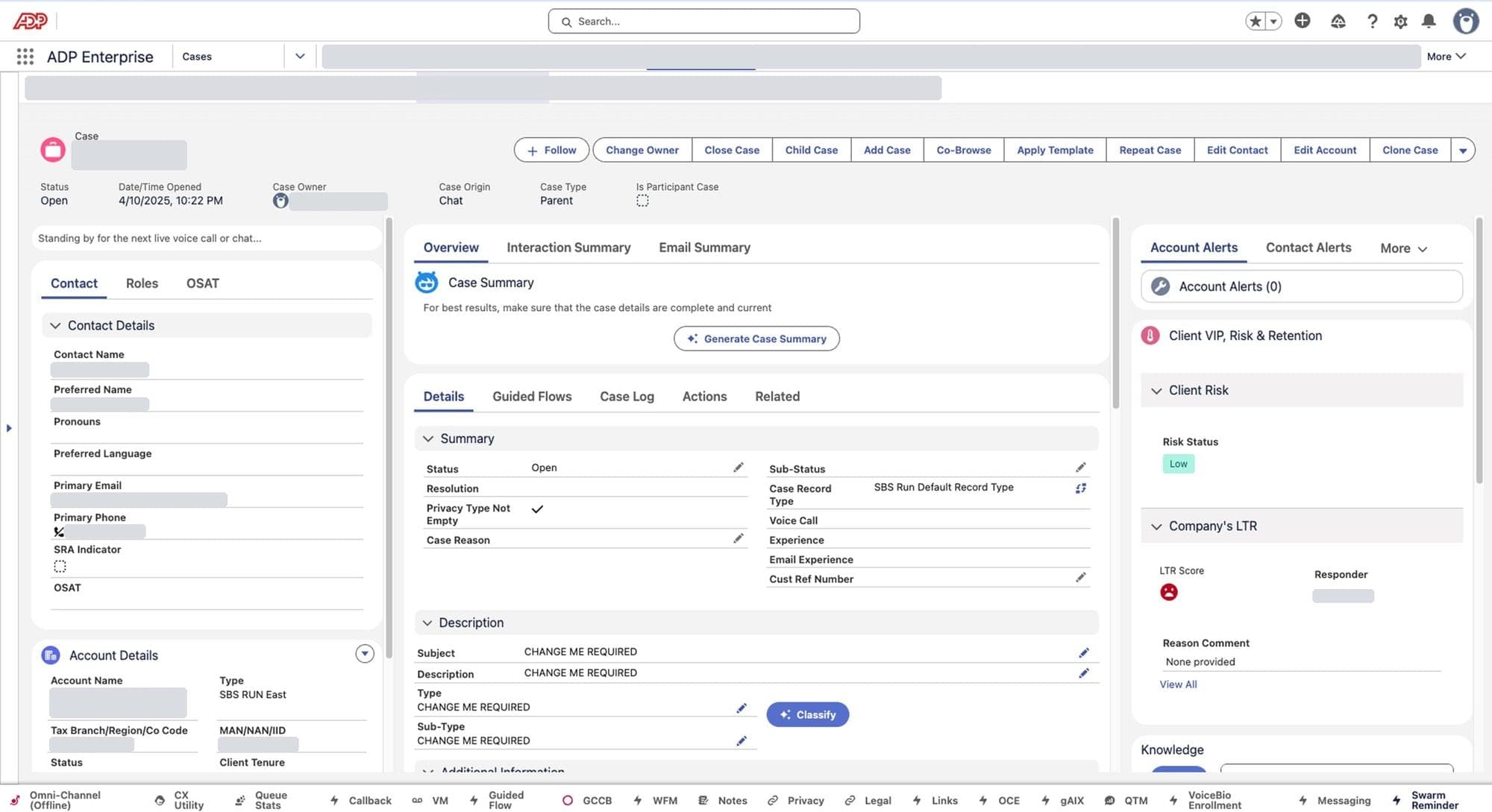
Every guided flow has the same shape: a client with a request, a step-by-step flow on the associate's screen, and an associate who has to get it right while the client is on the line. Here is one call, using RUN Reports.
- 01Alex calls supportAlex, a small-business client, can't generate a report on RUN, ADP's payroll platform.
- 02The associate opens a guided flowOne of about 10,000 support associates answers. A guided flow walks them through this kind of request.
- 03The flow sets the pathBefore the call reaches the associate, the system checks the case and sets a starting path. For Alex, that's Teach.
- 04Alex learns to do itThe associate walks Alex through generating the report, so next time Alex can do it without calling.
02 Problem
Twenty flows, built twenty ways, used live on client calls.
- ~20Guided flowsEach built differently
- 4–5Tabs per callIn the older flows
- ~165kCalls a yearOn Payroll Mistakes alone
The business was moving from Siebel to Salesforce, and about twenty guided flows already existed. Each was built differently, and developers built new ones by copying earlier flows, without guidelines.
Research was a heuristic evaluation of the older flows plus discussions with stakeholders. Each finding set a requirement, and each requirement became part of the framework.
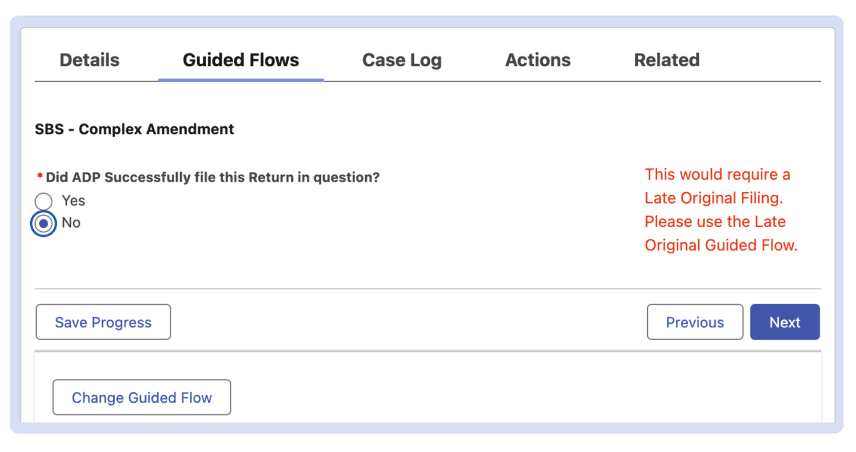
From finding to component
| What the older flows did | What the step needed | What I designed |
|---|---|---|
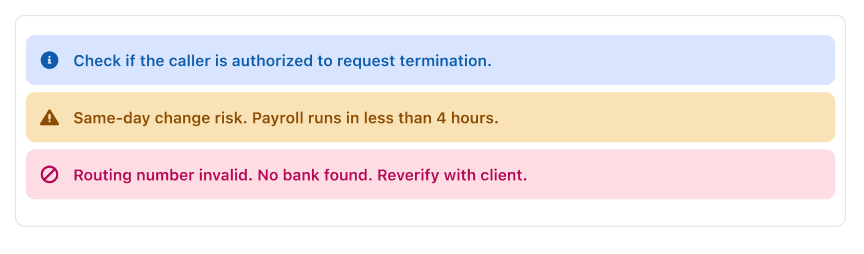
| Warnings were red inline text, placed differently in every flow. | Warnings and errors that look the same every time. | Scope Notifications |
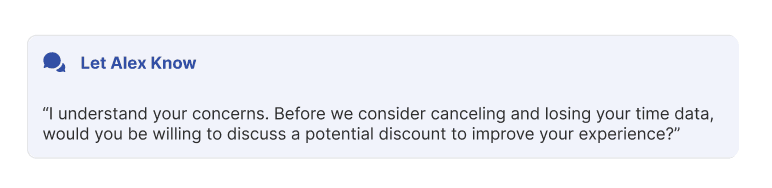
| Steps were pick-only: radio buttons, checkboxes, dropdowns, then Next. No script. | The words to say, at the right moment in the call. | Let Alex Know |
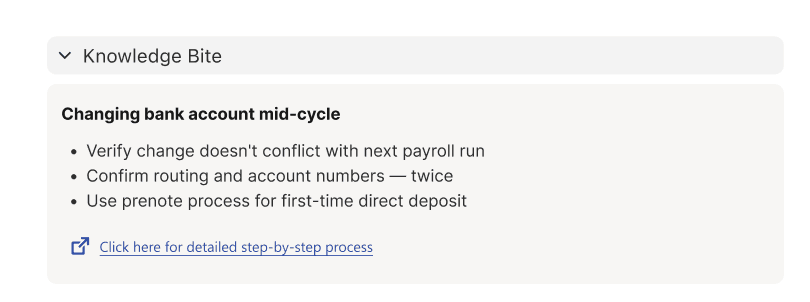
| The knowledge article was a bare link with no clue what it said. | The key points in the step, with the full article one click away. | Knowledge Bites |
| Nothing reusable. Developers built flows without guidelines. | One pattern, with rules for how to build it. | The framework |
03 Framework
Nobody asked for a framework. I proposed one.
I started where I was asked to: reading the business requirement documents, learning what stakeholders needed and designing the new flows. Mapping use cases in the older flows, I found the same problems throughout. Building on the same pattern would have given us five more flows with no real UX improvement. So I proposed a framework: a small set of components with built-in rules for creating every new flow.
How might we
- … give associates the same help at every step of every flow, so they can resolve a client's request without leaving the flow?
- 01 · InRequirementsBRDs, in whatever format each stakeholder sends
- 02 · The frameworkOne shared patternScope Notifications, Let Alex Know, Knowledge Bites, plus rules for how developers build with them
- 03 · Per flowFlow-specific logicFor example, Teach vs. Do in RUN Reports
- 04 · OutEvery step of every flowThe same four things for the associate, each time
What the associate gets at every step
- 1 · Information
The step itself
One question at a time, revealed progressively, with everything needed for this step in one place.
- 2 · Script
Let Alex Know
What to say to the client at that moment, so the associate doesn't have to recall it.
- 3 · Guidance
Knowledge Bites
The right knowledge, summarised in the step, so the associate doesn't have to search for it.
- 4 · Highlights
Scope Notifications
Warnings and errors that look the same in every flow.
Three components, deliberately few. Every extra pattern is something an associate learns and an engineer maintains.
Decision · Scope Notifications
- Rejected
- My own explorations for how warnings and highlights should look and behave. Flow Builder, the tool developers build flows in, has a limited component set and could not support them.
- Chosen
- Scope Notifications, a stock Salesforce component nobody was using. Developers could build it as it is, and existing platform capability is far more likely to survive handoff than something bespoke.
- Trade-off
- I gave up the custom designs and worked with four fixed SLDS 2 variants: default, info, warning and error.
Decision · Knowledge Bites
- Rejected
- A bare link to the knowledge article, as in the older flows, with no clue what it said.
- Chosen
- A 3–4 bullet summary of the right article in the step, so the associate can brief the client quickly, with the full article one click away.
- Trade-off
- A summary can't hold everything, so the full article stays linked.
How it evolved
First designs
- Followed the BRDs and the old system closely.
- Text-heavy and greyscale, with nothing to tell one element from another.
After design reviews, demos and UAT
- Colour and visual hierarchy, so associates can tell at a glance what each part of the screen is for.
- Let Alex Know created from review feedback.
- All three components became standard elements in every new flow.
04 RUN Reports
The system sets the starting path. The associate adapts it.
Before the call reaches the associate, back-end checks set the starting path. The business set these routing rules; I designed the associate's experience around them. Teach vs. Do came from stakeholder requirements and applies to RUN Reports only.
| Web inquiry? | Client terminated? | Registered user? |
|---|---|---|
| No | No | Yes |
The associate walks the client through generating the report. They can switch to Do, but must pick a reason first.
Inside Teach: who does what
| Step | Alex (client) | Associate | Guided flow |
|---|---|---|---|
| 1 · Identify | Says why they are calling. | Picks the situation: doesn't know how, lacks access, wants to learn, or doesn't want to spend the time. | Offers those four situations. |
| 2 · Choose | — | Keeps Teach, or switches to Do and picks a reason. | Teach is pre-selected. Do opens a reason dropdown. |
| 3 · Select | Says what they want to see. | Ticks what Alex wants to see. | Recommended reports follow. |
| 4 · Teach or Do | Learns to generate the report, or receives it. | Teach: walks Alex through it. Do: generates and shares the report. | Shows the Teach or Do path. |
| 5 · Summary | — | — | Records the choice and the report. |
Decision · Teach by default
- Rejected
- Letting the associate pick Teach or Do freely. There was no baseline: every associate would decide differently.
- Chosen
- Teach as the default, with a reason from a dropdown to switch to Do. Teaching takes longer on the call, but once a client can generate a report on RUN, they shouldn't need to call again for it.
- Trade-off
- Associates lose a free choice, and switching to Do takes an extra step.
05 Every kind of call
Different requests, the same pattern.
- Shipped · measured
RUN Reports
The client can't generate a report on RUN. Teach vs. Do, as walked through above.
- Shipped
Bank Account Changes
The client wants to change bank details. A Knowledge Bite covers changing them mid-cycle.
- Shipped · measured
Payroll Mistakes
The client found mistakes in employee payroll. About 165,000 calls a year.
- In review
TLM Termination
Retention first: the script offers a discount before cancelling. One flow with a branch per product. Timekeeping Plus is signed off; Time & Attendance and Timekeeping Basic are in review.
- Built on it
- All five new flows: four shipped, TLM in review.
- Next
- Upcoming guided flows will be built on the framework.
- Planned
- The business plans to redesign the ~20 older flows with it. Planned, not done.
06 Leading the work
Many teams build these flows. I got them building the same way.
The habit
Whichever development team has capacity builds the next guided flow, and teams used the previous flows as their guide, so each new flow copied the old patterns.
The pushback
If the patterns change, how do teams build new flows? I explained the logic behind each component and the value it brings. The business and the solution architect agreed.
Making it buildable
Developers couldn't build the components as designed at first. I worked through Flow Builder's limits with them and kept everything to what the Salesforce library supports. We agreed a rule: default text in default, errors in error, warnings for Alex in warning.
Holding the bar
Early builds didn't match the Figma designs, and the business didn't accept them. They backed building to the design exactly, with the extra time and cost that took.
A second designer
I turned the framework into a guideline (which component goes where, spacing and alignment, type sizes for header, body and footer), onboarded the Tax Notices designer with it and joined their stakeholder reviews. Tax Notices shipped on the framework.
07 Outcome
What changed on the call, and what I'd do first next time.
Average handle time · RUN Reports and Payroll Mistakes
Before
- 20–25 minutes per call
- Switching tabs and screens to find the right article or the next step
After
- 11–13 minutes per call
- One step at a time, with what to say, what to refer to and what to watch for in the step itself
That is what the framework was built to change. Operations tracked the figures and own their exact definitions; why calls got shorter is my reading, not a separately measured result.
If an associate hesitates mid-call, that's a design failure, not a training problem.
What I'd carry forward
Start with the live call
Before designing, I'd study how associates actually work on a call: what they go through, what they depend on, and the moments that matter. It's the gap I named in the research.
Script matters as much as screen
What the associate says is part of the experience. The right data and the wrong words are the same failure.
Settle components with the people who build them
Confirm usage, guidelines and consistency rules with developers and the solution architect first, then apply them across every design.